WhatsApp in the CRM
All WhatsApp chats in the customer record
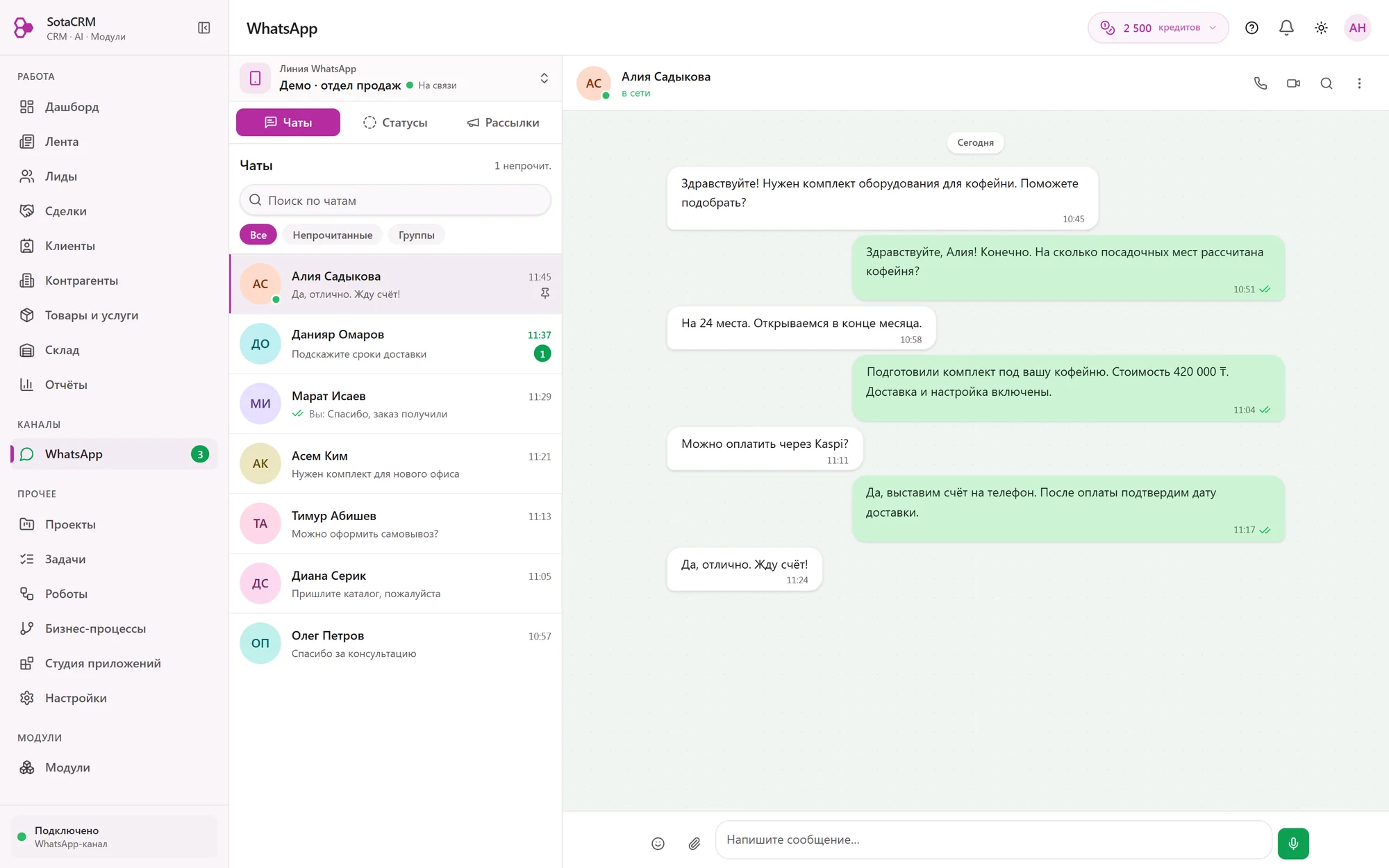
A customer writes to the company number, a manager replies from the customer record in the CRM. The whole history stays with the company.
30 days free, no card required
In brief
SotaCRM, a cloud CRM for businesses in Kazakhstan, connects a company's WhatsApp number by QR code, the same way as WhatsApp Web, and chats with customers run in the CRM. Messages, photos, files and read receipts appear in the customer record next to their deals. The Start plan includes 2 numbers, Pro 5, Business 8, and the Free plan one number for manual chats. An extra number costs 4 900 ₸ per month (prices as of 4 October 2026).
- WhatsApp numbers on Start, Pro and Business
- 2 · 5 · 8
- numbers per company, each extra one 4 900 ₸ per month
- up to 20
- on the Free plan, for manual chats
- 1 number
- usually, from sign-up to the first pipeline with WhatsApp
- 15 minutes
Chats
The chat and the deal in one record
Open a customer and you see the whole conversation, their deals and tasks. Nobody has to search a manager's phone for the chat.
- Shared company number
- Unread chats
- Full chat history
Everything the customer sent
Text, photos, files, quotes and reactions. You see whether a message was delivered or already read.
Calls in the log
Incoming WhatsApp calls also go into the history, so you see whom to call back.
From chat to pipeline
A chat with a new customer becomes a lead and moves through the stages to payment.
New messages in view
Chats with unread messages are marked, so you see them right away.
Numbers and team
A new manager picks up the same conversation
The number is connected to the CRM, and the whole history sits in customer records. A new employee opens the record and reads the conversation from the start.
- Sales departmentAssigned employees replyNumber 1
- Booking and questionsThe AI agent repliesNumber 2
- Head of the companyWrites to the AI assistantOutside the limit
Start includes 2 numbers, each extra one 4 900 ₸ per month
Numbers by plan
2 numbers on Start, 5 on Pro, 8 on Business. Each extra number costs 4 900 ₸ per month, up to 20 per company.
Shared by people and AI
Managers and AI agents share the plan's numbers. You decide which number a person handles and which one the AI handles.
Permissions by role
Roles define what each employee sees and can change.
A number for the head of the company
On Start and above, the AI assistant has its own WhatsApp number. The head of the company writes to it from their phone and manages the CRM. This number does not count towards the plan's numbers.
AI agent in WhatsApp
A late-night message does not wait until morning
The AI agent replies using the company's knowledge base during the hours you set, while you have AI credits. A manager can take over the conversation at any time.
- Customer: Good evening. Can I book a haircut for tomorrow?
- AI agent: Good evening. Tomorrow we have 11:00 and 15:30 free. Which time suits you?
- Customer: 15:30
- AI agent: You are booked for tomorrow at 15:30. See you then.
- Booking created · the manager can see the chat
What it looks like
A customer writes at 23:47
They ask whether they can book for tomorrow.
The AI agent replies
It offers a free time slot and, if Booking is connected, books the customer.
In the morning it is all in the CRM
The manager sees the booking and the whole conversation in the customer record.
1 AI agent on Start, 3 on Pro, 5 on Business. Each one needs its own WhatsApp number.
Messages triggered by events
The CRM messages the customer for you
On Start and above, a robot sends a WhatsApp message when a deal reaches the stage you choose.
Order ready
The deal moves to the “Ready” stage, and the customer gets a message that the order can be picked up.
Visit reminder
With the Booking module, a robot can remind a customer about their appointment.
Team notifications
Employees get WhatsApp notifications about new tasks and deals.
The Free plan has no automatic messages. The message texts in the examples are samples, you write your own.
Connection
The number connects by QR code
Sign-up, connecting a number and the first pipeline usually take about 15 minutes.
Start the connection in the CRM
The CRM shows a QR code for your number.
Scan the code with your phone
The same way you log in to WhatsApp Web.
Reply from the CRM
New customer messages appear in the CRM.
WhatsApp rules apply
This connection works like WhatsApp Web, without the official WhatsApp Business platform. WhatsApp may restrict a number if it considers such a connection a breach of its rules. In that case the number slot in your plan stays yours, and you can connect another number to it. Details are in clause 12.5 of the Public Offer (in Russian).
Plans
How many numbers each plan includes
Numbers are included in the plan price. You do not pay separately for connecting WhatsApp.
| Price per month for the company | Free0 ₸ | Start12 900 ₸ | Pro39 900 ₸ | Business89 900 ₸ |
|---|---|---|---|---|
| WhatsApp numbers manual chats only on the Free plan | 1 | 2 | 5 | 8 |
| Automatic messages to customers | no | yes | yes | yes |
| AI assistant number for the head of the company does not count towards the plan's numbers | no | yes | yes | yes |
| AI | ||||
| AI agents each one needs its own number | no | 1 | 3 | 5 |
Prices as of 4 October 2026, per month for the whole company, in tenge, not subject to VAT. An extra number costs 4 900 ₸ per month, up to 20 numbers per company.
Free trial
Connect a number and test it with your own customers
For 30 days the company gets everything in Pro: 5 WhatsApp numbers and 3 AI agents. No bank card required.
Questions
Frequently asked questions
Up to 20 per company. A plan includes 2, 5 or 8 numbers, and each extra number costs 4 900 ₸ per month.
Your number slot in the plan stays. You can connect another number to it, or the same one after the restriction is lifted. This risk is described in clause 12.5 of the public offer. With a QR code connection, the company accepts it.
Yes, up to 50 or 100 messages per day per company, depending on the setting. The CRM removes duplicate numbers and respects opt-outs sent with the word “СТОП” (stop). The company itself obtains customers' consent to receive messages, and bulk messaging gives no protection against a number being restricted.
SotaCRM currently connects only WhatsApp.
Didn't find an answer?
Tell us what your company does, and we will suggest a plan and modules.
Business days, 9:00–18:00 Astana time
What works together with WhatsApp
Booking
The customer picks a time online, and the CRM reminds them about the visit.
Kaspi Payments
A Kaspi invoice by phone number or QR, and the payment shows up in the deal.
AI agent
Replies to customers using the company's knowledge base and hands complex questions to a person.