CRM features
A CRM from the first lead to payment
Leads, deals, customers, tasks and stock in one program. On Start and above, the CRM creates tasks and moves deals on its own.
30 days free, no card required
In brief
SotaCRM is a cloud CRM for small and medium-sized businesses in Kazakhstan that takes a customer from the first lead to payment. Every plan, including the Free plan for 5 users, has leads, deals by pipeline stage, customers and companies, tasks and projects, products and stock, custom fields and data export. From the Start plan at 12 900 ₸ per month for 10 users (prices as of 4 October 2026), pipelines are unlimited, and the CRM itself creates tasks, messages customers in WhatsApp and moves deals through stages.
- Free plan for 5 users, with stock and tasks
- 0 ₸
- per month for a team of up to 10 users on Start
- 12 900 ₸
- pipelines, robots and business processes on paid plans
- Unlimited
- of custom fields, with no limit on the number of fields
- 22 types
Deals and pipelines
See where every customer is and what comes next
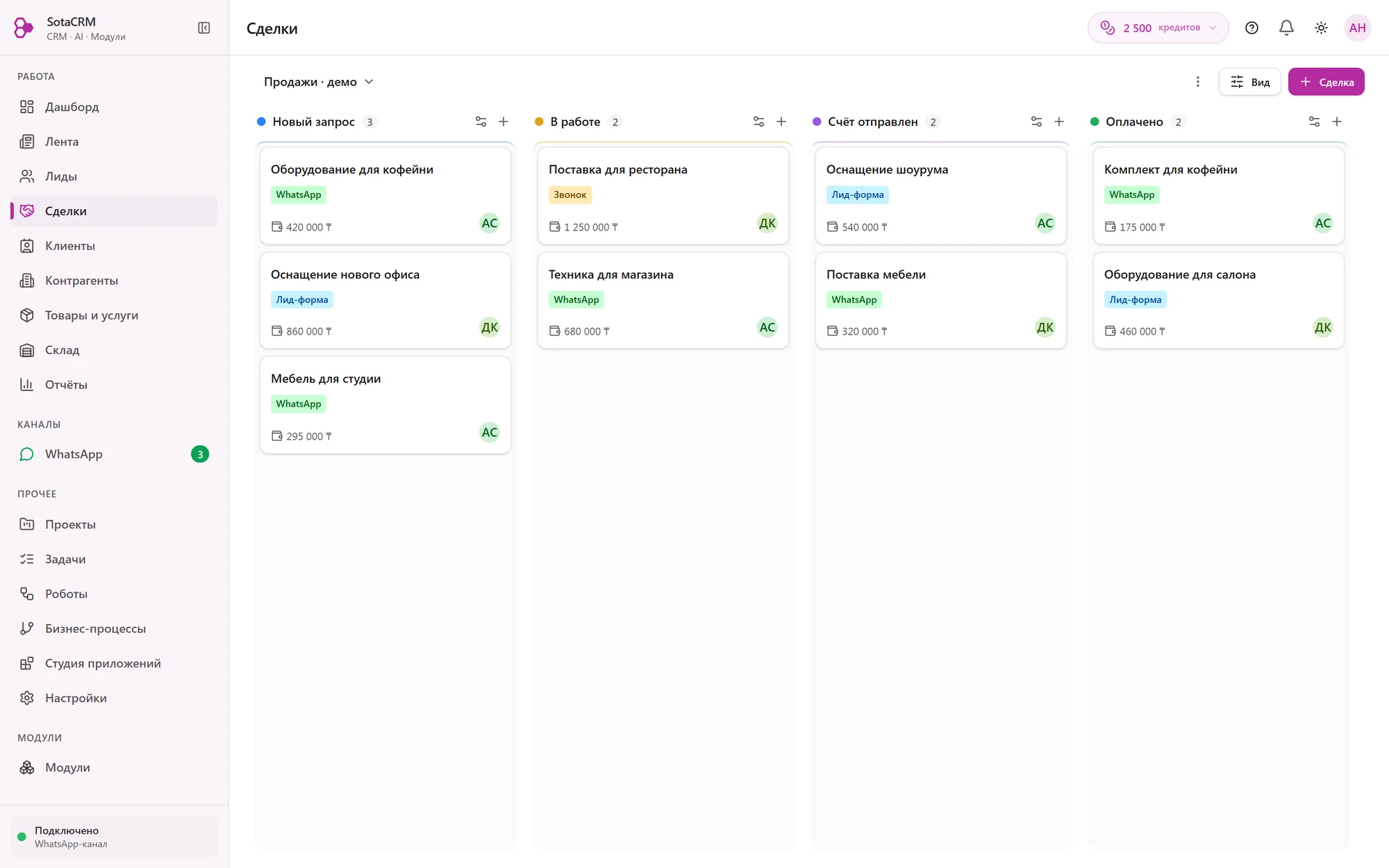
A deal moves through the stages of your pipeline. The deal card shows the owner, amount, products and full history.
- Stages from lead to payment
- Where the customer came from
- Who is handling the deal
Pipelines by business line
Retail, wholesale and service can each have their own stages. Paid plans have unlimited pipelines, the Free plan has one.
Where the customer came from
A lead keeps its source, ad tags (UTM) and owner.
Products and amount
An item keeps the price it had when it was added. The CRM calculates the discount, VAT and total, and the margin when the purchase price is known.
Payments in the deal
Cash, bank transfer and Kaspi are recorded in the same deal card. A repeated transaction does not count as a second payment.
Customers
When a customer writes again, the CRM knows them
The CRM keeps customers, companies and their contact persons. A new lead from the same number finds the existing record.
Customers and companies
The CRM keeps a person as a customer and a company as a counterparty with company details and contact persons.
Search by phone
When a lead becomes a deal, the CRM looks up the customer by phone number and uses their record.
Custom fields
22 field types, from date and amount to file and link to another record. No limit on the number of fields.
Export at any time
You can export your data on any plan, even if a payment has not arrived.
Tasks and projects
“I'll call you back” becomes a task
Every task has a deadline and an owner. You see what is in progress and what is already done.
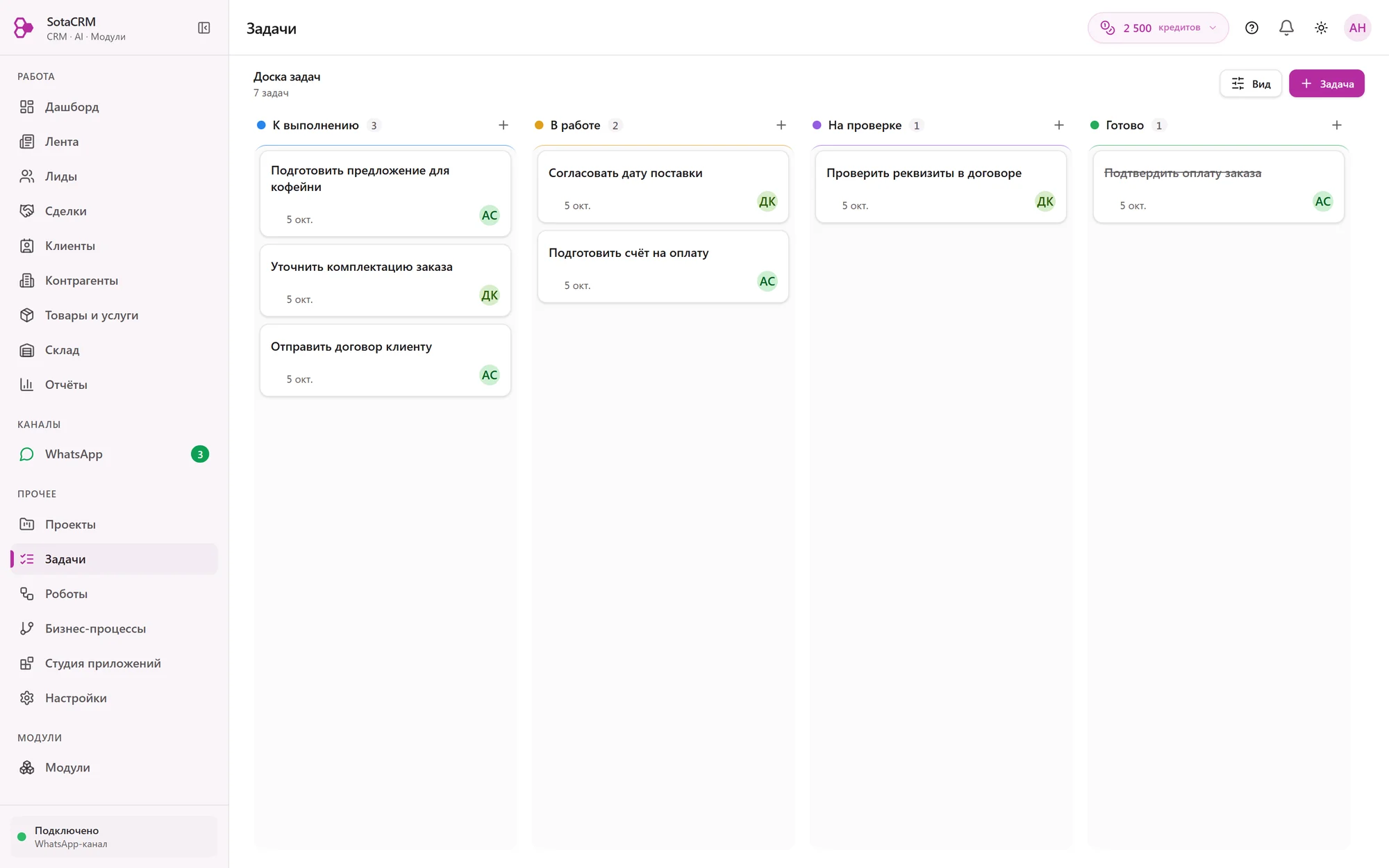
- What is in progress and what is done
- A deadline for every task
- Who is responsible for the task
My tasks
An employee opens their own list and sees only their own work.
Projects
Tasks can be grouped into a project with members. People outside a private project do not see it.
Notifications in WhatsApp
The CRM sends notifications about tasks and deals inside the program and in WhatsApp.
Company feed
News, comments and mentions of colleagues inside the CRM.
Automation
The CRM does the repetitive work itself
On Start and above, robots and business processes (automation rules and workflows) create tasks, message customers in WhatsApp and move deals through stages.
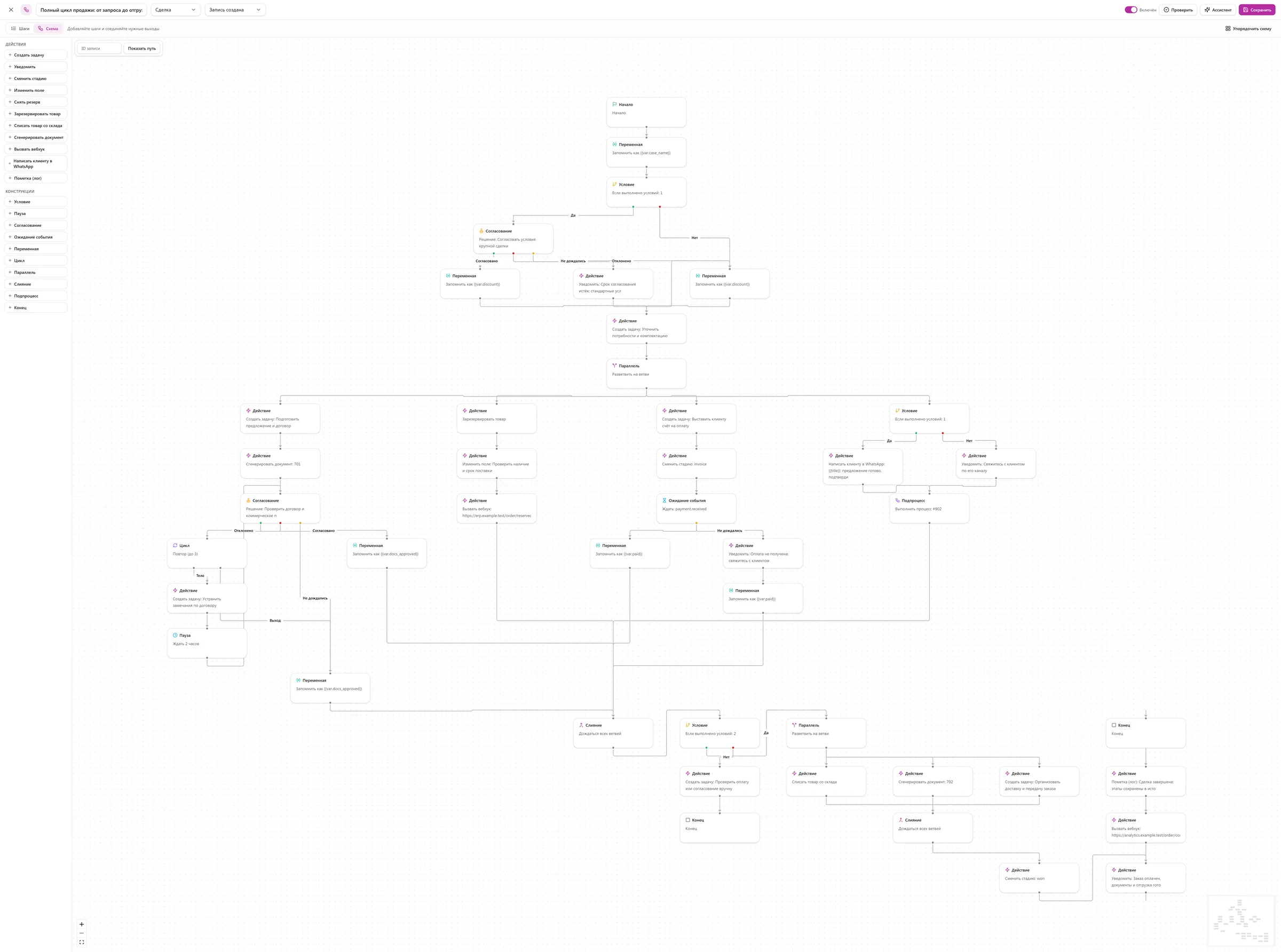
- Different steps for yes and no
- A person makes the decision
- Tasks run in parallel
- Waits for payment and continues on its own
How a robot works
- Event
A deal moved to the “Paid” stage
A robot reacts to one of 16 events: a new lead, a stage change, a payment, a product shortage.
- Condition
The deal is in the “Retail” pipeline
Conditions combine with “and” and “or”, and the action can be delayed.
- Action
A manager gets a task to hand over the order
A robot has 11 actions in total, among them a WhatsApp message to the customer, a stage change and a product reservation.
Business process
A chain of steps with branches, waiting and approval. For example, the head of the team first approves a large order, and only then does the deal move on.
Flow from a description
Describe the process in words, and the AI assistant suggests a flow. You check it and switch it on yourself.
Test before launch
You can run a robot in test mode, and loop protection stops it from firing endlessly.
The Free plan has no automation. Paid plans have unlimited robots and business processes.
Compare plansProducts and stock
Products, stock and reservations next to deals
A catalog with photos and prices and stock tracking are available on every plan, including Free.
Catalog
Products and services with photos, prices and categories. On Start and above, the AI agent shows them to customers in WhatsApp.
Stock in, stock out, transfers
Every movement goes into a log, and stock levels can always be recalculated from it.
Reservation for a deal
On Start and above, a robot reserves products for a customer and writes them off after the sale. If stock runs short, the CRM starts an automation, for example a purchase task.
Team and access
Everyone sees what they need
Roles define who sees and changes what. The AI works with the permissions of the employee who asked it.
Roles and permissions
For example, a manager sees only their own deals and the head of the team sees all of them. Permissions are set by role and by individual record.
One price for the whole team
A plan includes 10, 30 or 50 users. While you stay within that limit, a new employee does not change your bill.
Audit log
On the Business plan you see which employee did what and when.
Management from your phone
On Start and above, the AI assistant has its own WhatsApp number. The head of the company messages it and gets answers based on CRM data.
Reports
Sales figures without a calculator
The Sales report shows what was sold and for how much. The AI assistant gathers other figures on request.
Sales report
Items sold for a chosen period, with CSV export. Margin is shown when the purchase price is set.
Charts on request
Ask the AI assistant, and it gathers figures on deals and builds a chart.
Sales from 1C:Fresh
With the 1C:Fresh module, the CRM builds a sales report from 1C for a period of 1 to 366 days.
On Pro and above
Your own apps and connections to other programs
When the standard sections are not enough, you can extend the CRM. Some settings need a developer.
Connections to other programs
REST API, webhooks and MCP keys for connecting external AI models. Webhooks work on Start and above.
App Studio
Describe the task in words, and the AI builds a small app inside the CRM. The company owner installs it.
Custom development
Anything the CRM does not have, we build to an estimate, at 12 000 ₸ per hour.
Free trial
Everything in Pro for 30 days
Sign up, connect a WhatsApp number and set up your first pipeline. This usually takes about 15 minutes.
Questions
Frequently asked questions
Yes, on every plan, including Free. The CRM records stock in, stock out, reservations, transfers and adjustments, and a shortage can start an automation.
Unlimited on paid plans. The Free plan has one pipeline. Custom fields are unlimited on all plans, with 22 field types to choose from.
No. You build robots and business processes in the CRM itself, and the AI assistant can suggest a flow from a description. A developer is needed to connect other programs through the API.
Yes, this is part of implementation. The Start implementation package for 49 900 ₸ imports up to 2 000 customers from Excel or Google Sheets, the Standard package for 119 900 ₸ up to 10 000 records with duplicate checks.
Not through the settings. Custom fields can be added to records without limits, and we build a new section as custom development to an estimate, 12 000 ₸ per hour.
Didn't find an answer?
Tell us what your company does, and we will suggest a plan and modules.
Business days, 9:00–18:00 Astana time
What else SotaCRM has
WhatsApp in the customer record
The company number connects by QR code, and all chats stay in the CRM.
AI agent and AI assistant
One replies to customers in WhatsApp, the other helps the team in the CRM.
Plans from 0 ₸
One price for the whole company, the first 30 days are free.